Pitch documentation
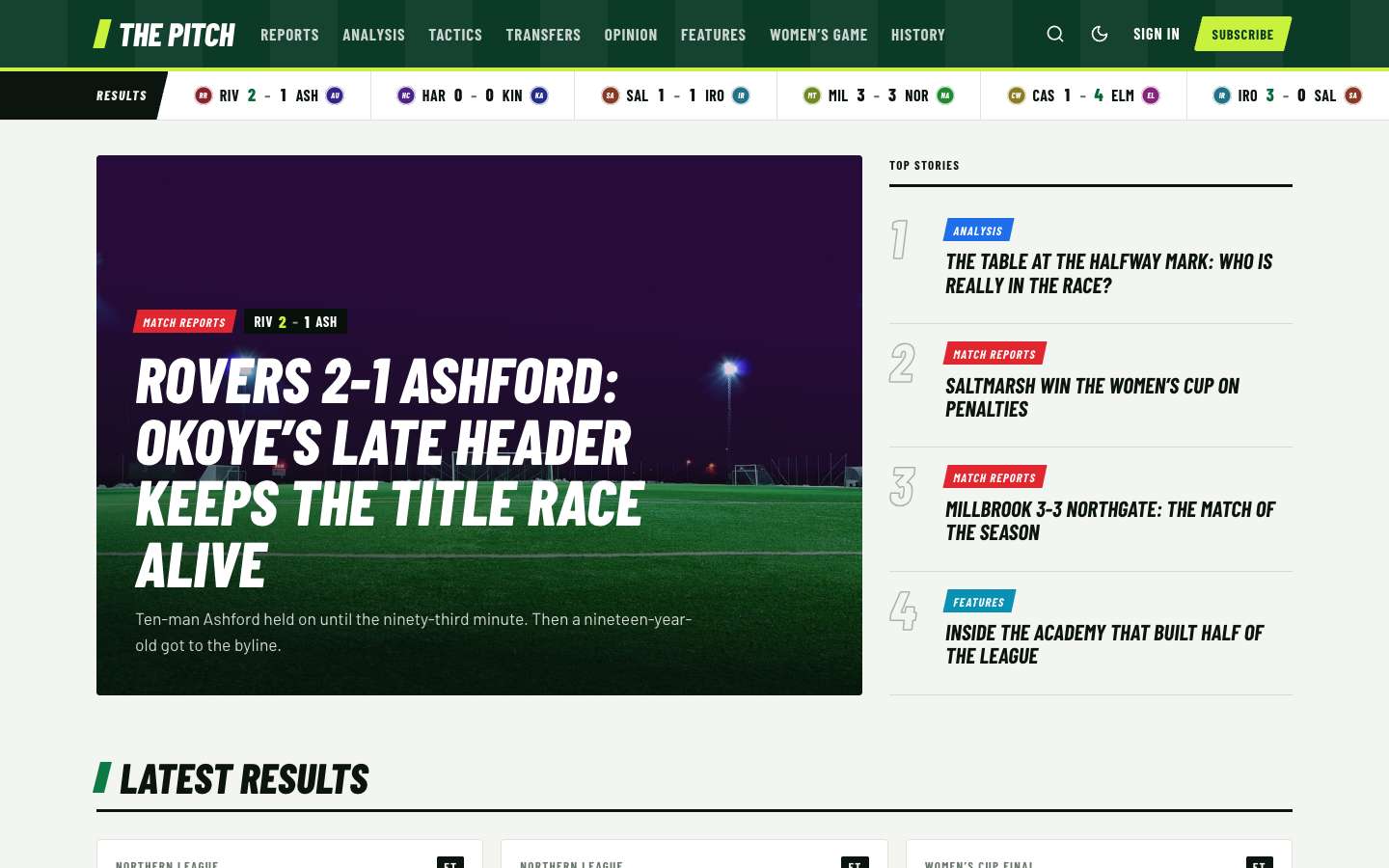
A bold football and sports magazine theme for Ghost: a live-style results strip, scoreboards and result cards made from one tag, league tables, match timelines and a column template.
Thank you for choosing Pitch. This guide covers everything from uploading the theme to setting up paid memberships. If something is not covered here, write to support@codememory.com — we answer within one working day.
- Version1.0.0
- Ghost6.0.0 or later
- Live demopitch.ghostcms.templates.codememory.com
- AuthorCode Memory
Highlights
- One internal tag per match report (#score Riverside Rovers 2-1 Ashford United) makes the scoreboard, the result card, the results strip and the score on every card
- Club crests drawn from the team name: initials on a colour that stays the same for each club everywhere on the site
- A results strip under the header that scrolls by itself (and stops on hover or with reduced motion)
- Homepage with a lead story, a numbered Top stories list, Latest results cards and the latest posts
- Match header with a full-width scoreboard: both teams, the score, the winner in colour, the competition (#comp) and the ground (#venue)
- League tables: any table with a Pts column gets crests, green promotion rows, red relegation rows and W/D/L form pills
- Match timelines: a list of minutes (27' Goal! …) becomes a timeline with icons for goals, cards, substitutions and whistles
- Two post layouts: the match/story page and Column, led by the writer's portrait, for opinion pieces
- Light by default, with a floodlit dark mode and a reader toggle
- Sections (topics) and The team (writers) page templates
- Membership page with tiers and a monthly/yearly switch; styled paywall for members and paid stories
- Sign in, sign up and account pages
- Reading progress bar, image lightbox, galleries, callouts and toggle cards
- Self-hosted fonts (Barlow Condensed, Barlow)
- Fully translatable, 18 theme settings, no jQuery
What is in the download
themeforest-pitch-ghost-theme/
├── documentation/                          ← you are here
├── sample-content/pitch-sample-content.json  ← optional demo posts (see Sample content)
└── pitch_1.0.0_for_ghost_6.0.0_or_later/
    ├── pitch.zip                          ← upload this file to Ghost
    └── pitch/                             ← the same theme, unzipped, with source files
You only need pitch.zip to use the theme. The unzipped folder is there for developers who
want to change the code (see Development).
Installation
- Sign in to your Ghost admin (
yoursite.com/ghost). - Go to Settings → Design & branding → Customize → Change theme.
- Click Upload theme and choose
pitch.zipfrom thepitch_1.0.0_for_ghost_6.0.0_or_laterfolder. Do not upload the whole download. - Click Activate.
Updating
When a new version is released, download it from your ThemeForest Downloads page and upload the new
pitch.zip the same way. Ghost asks whether to overwrite the existing theme — choose
Overwrite. Your content, navigation and theme settings are kept.
If you edited the theme files yourself, keep a copy of your changes first: an update replaces every file.
Quick setup (10 minutes)
To make your site look like the demo, do these steps in order. Each one is explained in detail further down.
- Brand: Settings → Design & branding → set the Accent colour, upload a logo and a site icon.
- Navigation: Settings → Navigation → add your main links (see Navigation).
- Pages: create the pages in Pages and templates and pick the matching template.
- Membership: Settings → Membership → turn on signups; add paid tiers and connect Stripe (see Membership).
- Theme settings: Design & branding → Theme tab (see Theme settings).
- Match reports: add an internal tag
#score Home 2-1 Away, for example#score Riverside Rovers 2-1 Ashford United. Add#comp Northern Leagueand#venue Riverside Parkif you like. - Lead story: mark posts as Featured. The newest leads the homepage; the next four make the Top stories list.
- League zones: set Promotion places and Relegation places to match your league.
Sample content
The download includes the demo's text as a Ghost import file:
sample-content/pitch-sample-content.json. It holds 31 posts, 8 pages, 8 tags
and the demo writers, with the same templates and settings per post as the live demo. Use it to see how
Pitch looks with real content, or as a starting point you edit.
- Use a new or test site — the import adds posts next to anything you already have.
- Go to Settings → Advanced → Import/Export → Import content.
- Choose
pitch-sample-content.jsonand confirm. - Set up Navigation, page templates and theme settings as described below. Ghost does not import these from a content file.
Logo, colours and fonts
Accent colour
Settings → Design & branding → Accent colour. Pitch uses it for buttons, links, highlights and the reading-progress bar. Pitch uses your accent colour (pitch green #0B7A45 by default) for buttons, links, goal minutes, the winning score and the reading progress bar. The lime highlight in the header and footer is part of the design. Each tag's accent colour is used for its label on cards and in the Sections page.
Logo
Upload a logo in Design & branding → Brand. Without a logo, Pitch shows the site title in the theme's display font. A transparent PNG or SVG around 400 × 100 px works best. If your logo is dark, upload a light version in the Theme tab under Logo for dark mode.
Fonts
Pitch ships its own fonts (Barlow Condensed, Barlow), hosted inside the theme — no requests to Google. To use different fonts, pick a Heading font and Body font in Design & branding → Brand. The theme follows your choice everywhere. Choose Theme default to go back.
Light and dark mode
In the Theme tab, Color scheme sets the default: Light, Dark or System (follows the reader's device). Readers can switch with the moon/sun button in the header or the switch in the menu; their choice is remembered on that device.
Theme settings
Settings → Design & branding → Customize. Theme settings are split between the Site wide, Homepage and Post tabs. Every setting:
| Setting | Group | Type | Default | What it does |
|---|---|---|---|---|
| Color scheme | Site wide | select | Light (Light / Dark / System) | Readers can still switch with the sun/moon button. |
| Logo for dark mode | Site wide | image | — | Optional light version of your logo for dark mode. |
| Newsletter title | Site wide | text | The final whistle | Title of the newsletter box. |
| Newsletter text | Site wide | text | empty | Text of the newsletter box. Empty = site description. |
| Footer text | Site wide | text | empty | Small footer line. Empty = site description. |
| Show share buttons | Post | boolean | On | Share buttons (X, Facebook, LinkedIn, copy link) under posts. |
| Show author box | Post | boolean | On | Author photo and bio under posts. |
| Show related posts | Post | boolean | On | Three posts from the same tag under each post. |
| Show reading progress | Post | boolean | On | Progress bar at the top of the screen while reading a post. |
| Show ticker | Site wide | boolean | On | A strip of recent results under the header (posts with a #score tag). |
| Ticker label | Site wide | text | Results | Label at the start of the results strip. |
| Show results | Homepage | boolean | On | Result cards for the latest match reports. |
| Results title | Homepage | text | Latest results | |
| Latest title | Homepage | text | Latest | |
| Show league tables | Post | boolean | On | Style tables with a Pts column as league tables. |
| Promotion places | Post | select | 2 (0 / 1 / 2 / 3 / 4) | Rows at the top of a league table marked in green. |
| Relegation places | Post | select | 3 (0 / 1 / 2 / 3 / 4) | Rows at the bottom of a league table marked in red. |
| Show timeline | Post | boolean | On | Lists of minutes (12' Goal …) become a match timeline. |
Scores, crests and the results strip
Pitch reads the score from an internal tag (a tag whose name starts with #, which readers never see):
- In the post settings, add a tag
#score Home 2-1 Away. The team names can have spaces:#score Castleford Wanderers 1-4 Elmwood. - Optional:
#comp Women's Cup finalfor the competition and#venue Northern Stadiumfor the ground. - Publish. The post now has a scoreboard under its header, a score on its card, a result card on the homepage and a place in the results strip.
Crests are drawn from the team name: the initials on a colour made from the name, so Riverside Rovers is always the same colour. The winning side is shown in the accent colour; a draw marks no winner. The strip shows the 12 newest results; hide it with Show ticker or rename it with Ticker label.
League tables
Add a normal table in the editor (or paste one from a spreadsheet). When its header row has a Pts column, Pitch turns it into a league table:
- A crest before each name in the Team column.
- The first rows marked green and the last rows marked red, set by Promotion places and Relegation places. Short extracts (for example the top four) get no zones.
- A Form column with letters such as
WDWLWbecomes coloured pills. - On phones, the W, D and L columns are hidden and the table scrolls sideways if it is still too wide.
Tables without a Pts column stay plain. Turn the feature off with Show league tables. The column names are translatable in locales/.
Match timelines
Write a bulleted list where every item starts with a minute:
- 1' Kick-off
- 27' Goal! Marcus Webb curls a shot in (1-0)
- 45+2' Half-time whistle
- 81' Red card for Leon Carver
Pitch turns it into a timeline. Items with Goal, Yellow card, Red card, Substitution or a whistle get their own icon, and goals are shown in bold. Lists with fewer than three items, or where one item has no minute, stay normal lists. Turn it off with Show timeline.
Columns
Choose the Column template in the post settings for opinion pieces. The header shows the primary author's portrait on the pitch stripes, a Column badge, the title in quotes and the author's bio. Upload a profile picture for each writer; an upright portrait looks best.
Pages and templates
Pitch includes page templates for the pages every membership site needs. Create a page in Ghost (Pages → New page), set its URL in the page settings, then choose the Template in the same panel.
| Template | Suggested URL | Use |
|---|---|---|
Topics (sections)custom-topics.hbs | /topics/ | Every public tag as a large tile in its accent colour, with its image, description and story count. |
Writerscustom-writers.hbs | /writers/ | Every author with at least one story: photo, location, bio and story count. |
Membershipcustom-membership.hbs | /membership/ | Your tiers with a monthly/yearly switch. The page body (for example a FAQ made of toggle cards) appears below. |
Signincustom-signin.hbs | /signin/ | Email sign-in form (magic link) with the page's feature image. |
Signupcustom-signup.hbs | /signup/ | Free signup form with name and email and the page's feature image. |
Accountcustom-account.hbs | /account/ | Signed-in members see their plan, renewal date, card and links to manage billing and newsletters. |
Tip: the membership page shows your tiers automatically. Anything you write in the page body appears underneath — the demo uses toggle cards for a FAQ.
Post templates
Choose a template per post in the post settings panel → Template.
| Template | Use | |
|---|---|---|
Columncustom-column.hbs | An opinion page led by the writer's portrait, with a Column badge and no scoreboard. |
Membership, tiers and payments
Pitch is built for Ghost's members features: free and paid signups, tiers, a paywall and the Portal popup.
1. Turn on signups
Settings → Membership → Access → Who should be able to subscribe? → Anyone can sign up.
2. Connect Stripe
Settings → Membership → Tiers → Connect with Stripe. Use test mode first, then switch to live mode when you are ready to take real payments.
3. Create tiers
Settings → Membership → Tiers. Add a name, monthly and yearly prices, a description and benefits. Pitch shows every public tier on the membership page with a monthly/yearly switch, and marks the second tier as Most popular.
4. Members-only content
In a post's settings set Post access to Members only, Paid-members only or
specific tiers. Readers without access see the start of the post and a paywall box that invites them to join
or upgrade. To choose where the preview stops, add a Public preview divider in the editor
(type /public).
5. Sign-up forms and buttons
Subscribe forms in the theme create free members and send a confirmation email. Every Subscribe, Sign in and Account button opens Ghost's Portal popup, so members can change plans, update cards and cancel without leaving your site.
config.production.json.Reading features
- Reading progress bar on posts, in the post's topic colour (can be turned off in the Post tab).
- Image lightbox: click any image or gallery photo in a post to see it full screen; use the arrow keys to move through a gallery.
- Every editor card is styled: images (regular, wide, full), galleries, quotes, callouts, toggles, bookmarks, buttons, videos, audio, files, products, headers and signups. Create a page with every card to check your brand — the demo's style guide shows them all.
Posts per page
The home, tag and author pages load 9 posts, then a
Load more button fetches the next set without reloading the page. To change the number, edit
"posts_per_page" in package.json, zip the theme folder and upload it again.
Translation
Every word in the theme can be translated.
- In the unzipped theme folder, copy
locales/en.jsonto a new file named after your language code, for examplelocales/fr.json. - Translate the values (the text on the right). Keep the keys (the text on the left) and anything in
{curly braces}unchanged. - Zip the theme folder and upload it.
- Settings → General → Publication language → enter the same code (
fr).
Custom CSS
Small style changes do not need a new theme upload. Settings → Code injection → Site header:
<style>
.scoreboard { background: #1b1030; }
.ticker-label { background: #e0262f; }
</style>
Development
For larger changes, work on the unzipped pitch/ folder. You need Node.js 20 or later.
cd pitch
npm install        # once
npm run dev        # rebuild CSS/JS on every change
npm run build      # one-off build
npm test           # check the theme with gscan
npm run zip        # dist/pitch.zip, ready to upload
CSS lives in src/css (one file per area, joined by main.css); JavaScript in
src/js. Built files go to assets/built. Templates are Handlebars files in the theme root
and in partials/.
Questions
The homepage looks empty after I activated the theme.
The home sections use your posts, featured posts and tags. Publish a few posts, mark some as Featured and add tags. The lead story needs a featured post; Latest results needs posts with a #score tag.
The membership page shows no prices.
Paid tiers only appear once Stripe is connected and the tiers are public (Settings → Membership → Tiers).
Sign-in emails do not arrive.
Check your email settings (self-hosted: Mailgun or SMTP in the config file). Ask readers to look in their spam folder.
How do I remove "Published with Ghost" from the footer?
Delete the link from partials/footer.hbs in the unzipped theme, zip the folder and upload it again.
Can I use the theme on more than one site?
A Regular licence covers one site (one end product). Buy one licence per site.
Are the demo images included?
No. Demo photos come from Pixabay and are only used on the demo site. The theme itself contains no stock photos.
Support
Support is included with your purchase and covers: answering questions about the theme's features, and fixing bugs. It does not cover custom changes or problems with third-party code.
Email support@codememory.com with your purchase code and your site address. See the changelog for what changed in each version and third-party materials for credits.